💳 24H TRIAL — $1
Full premium access for $1.
How to Install IPTV on Amazon Firestick in 2026 — Step-by-Step Guide
Set up your streaming subscription on Firestick in less than 5 minutes. Complete tutorial with screenshots.
Q4TV Expert
In short: to install IPTV on an Amazon Firestick, enable apps from unknown sources in settings, install the Downloader app, download a player such as IPTV Smarters or TiviMate, then enter the credentials from your provider. The whole process takes under 5 minutes and unlocks 79,000+ channels in 4K with Q4TV.
Firestick: The Most Popular Streaming Device in 2026
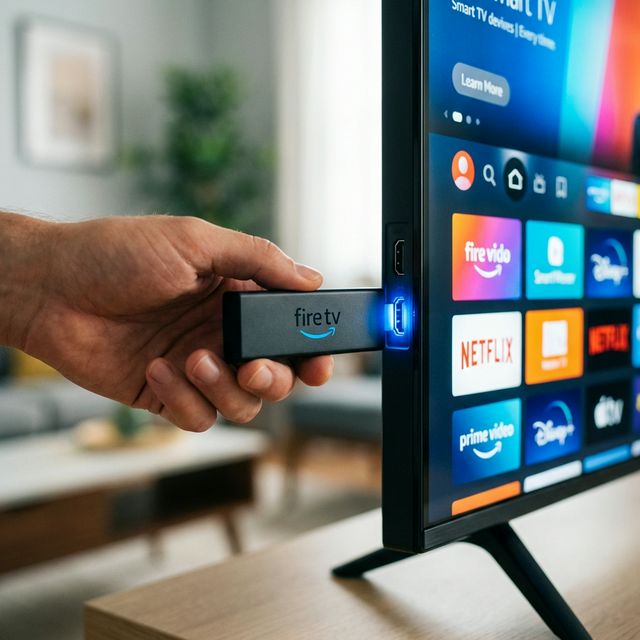
Amazon's Firestick is the most popular device for enjoying streaming on any TV with an HDMI port. Compact, affordable (around $40 to $60), and compatible with every major IPTV app, it turns an old television into a Smart TV in minutes. New to the technology? Start with our guide to what IPTV is to understand how the stream reaches your screen. This step-by-step tutorial shows you how to set up your Q4TV subscription from start to finish.
Before you begin, make sure you have: a Firestick plugged into HDMI, a stable Wi-Fi or Ethernet connection of at least 25 Mbps for 4K, and your Q4TV credentials (sent via Telegram or email after purchase). Don't have access yet? Activate a free 24-hour trial before subscribing.
Step 1: Prepare and Update Your Firestick
Make sure your Firestick is connected to the internet and up to date. Go to Settings > My Fire TV > About > Check for Updates. A recent system version (Fire OS 7 or higher) prevents installation bugs and improves smooth 4K decoding.
Step 2: Allow Third-Party Apps
Go to Settings > My Fire TV > Developer Options > Install Unknown Apps, then enable the permission for Downloader. On some newer models this menu is called "Apps from Unknown Sources." This step is essential because not all IPTV players are available on the official Amazon Appstore.
Step 3: Install the Downloader App
In the Firestick search bar (magnifying glass icon, top left), type "Downloader" and install the free orange-icon app. It is the official tool recommended by Amazon for downloading installation files (.apk) directly from a URL.
Step 4: Download Your Player (IPTV Smarters or TiviMate)
Open Downloader, go to the "Home" tab, and enter the URL that Q4TV provides after your purchase. The app downloads and installs automatically. IPTV Smarters Pro is ideal for beginners (simple, free interface), while TiviMate offers a more advanced TV guide (EPG). To compare the best options, see our top 5 IPTV apps for 2026.
Step 5: Enter Your Q4TV Credentials
Launch the app and enter the credentials received via Telegram or email: username, password, and server URL, or simply your Xtream Codes / M3U link. Within seconds, your 79,000+ channels and 249,000+ movies in 4K load up. Want to install it on other devices too? Find out whether you can use IPTV on multiple devices.
Pro Tips for the Best Experience
- Wired connection: use an Ethernet adapter on the Firestick for a more stable connection during live matches, especially in 4K.
- Anti-buffering: if the picture buffers, lower the quality or follow our guide to stop IPTV buffering.
- 24/7 support: reach our Telegram support any time; an agent can guide you remotely if you get stuck.
- Restart: if the image freezes, a simple Firestick restart (Settings > My Fire TV > Restart) fixes 99% of issues.
"The setup took exactly 3 minutes. I was surprised how simple it was!" — Thomas, Lyon
Is IPTV Legal on Firestick?
Yes — the Firestick and IPTV technology are perfectly legal. Legality depends solely on the provider's content licensing, not on the device. For a full country-by-country breakdown, read our is IPTV legal guide, and always choose a transparent service that offers a trial and clear support.
FAQ
How do I install IPTV on a Firestick?
Enable apps from unknown sources in settings, install Downloader, download a player (IPTV Smarters or TiviMate) via the provided URL, then enter your Q4TV credentials. The whole thing takes under 5 minutes.
Which IPTV app should I choose on Firestick?
IPTV Smarters Pro is the easiest for beginners; TiviMate offers a fuller TV guide (EPG) for advanced users. Both work perfectly with Q4TV. See our app comparison.
Why does my Firestick buffer IPTV?
Buffering usually comes from a slow connection or congested Wi-Fi. Switch to Ethernet, restart the Firestick, or lower the resolution. Our anti-buffering guide details every fix.
Can I install Q4TV on multiple Firesticks?
Yes, you can install the app on as many devices as you want, but a standard subscription allows only one screen at a time. See the options in our IPTV on multiple devices guide.
Conclusion
Setting up Q4TV on Firestick is fast and simple: in under 5 minutes you get access to 79,000+ channels and 249,000+ movies in 4K quality, with instant activation and 24/7 Telegram support. Enjoy a 15-day money-back guarantee. Get started in 5 minutes or try it free for 24 hours tonight.
Share This Article
Newsletter
New arrivals, events, style guides & special offers.
Recommended Articles

Best IPTV 2026: Complete Guide to Choosing Your Subscription
Streaming vs Cable: Why Millions of French People Are Switching in 2026

The 10 Must-Watch Films and Series to Stream in 2026